FG Vector
Know Your Golf Shot

Golf training that keeps you coming back.

A camera-based launch monitor and a 3D driving range, on the iPhone you already have. Every shot detected, the ball measured from video when it can be, your numbers read out loud, the flight replayed on the range.

5 free training sessions, no time limit · No payment details required
iPhone camera only AI body tracking Voice feedback in 16 languages Apple Watch & Garmin
Where it works best

FG Vector reads your swing from video and sound, so the setup matters. Here is what to expect.

5/5

Driving range, off a mat

Fixed ball position and level ground. The phone stays put, so every swing is framed the same way.

4/5

Indoors, into a net

Good, steady lighting and a setup you leave standing. Distances are estimated from launch, because the ball stops in the net.

3/5

Driving range, off grass

The ball moves a little with every shot and the ground is uneven, so the framing needs more attention.

2/5

On the course

You move after every shot, so re-setting the tripod each time is impractical. Good for the occasional swing, not a full round.

Driving View

Every shot flies again on a 3D driving range.

Every shot with numbers flies again on a photorealistic 3D driving range, built from its ball speed, launch, apex, carry, total and start direction. It needs no video, so your shots stay on the range even after you delete their videos.

Behind the golfer or follow the ball

Open a shot and tap the mountains icon at the top right. Watch the flight from behind the golfer or follow the ball, in four seasons, with a golf course around the range.

Your session, ready to share

A training day’s shot dispersion shows the flight curves of your shots: compare clubs, for example gap wedge and pitching wedge, and turn the view. Share a picture of it, or a video of a flight in 9:16 or 4:5 with your numbers popping in.

On a TV at the net (experimental)

Hitting into a net? With FG Lab, connect a TV or monitor by cable and every shot flies on the big screen in landscape while your iPhone records on the tripod, with a table of your shots and the median. Off by default — and FG Lab is now included in your 5 free training sessions.

Competitions and challenges
How it works

Set it up once. Then just swing.

There is no record button. FG Vector watches your body, hears the impact, and does everything automatically.

1

Mount your iPhone

Tripod, three normal steps away so your whole body and the full club fit in frame, lens at fingertip height, facing your stance. The on-screen silhouette guides your framing.

2

Address the ball

The AI detects your golf posture and arms the recording. The app recognizes the moment of impact from the sound and the video.

3

Hear your result

Shot shape, carry, and total — announced out loud in your language, sent to your watch, and saved with video.

What you need

iPhone on a tripodDaylight or good lightingWhite ballsSound on

FG Vector is a camera system: it reads the ball from video, so it needs light. In low light — at dusk or in a dim indoor space — the ball can't be measured. The app tells you and won't say “Ready to play” until there's enough light. Keep the sound on: the app tells you by voice when to play.

How to play

1 Sound on2 Place a ball3 Step up and wait for “Ready to play”4 Hit5 Wait for the result6 Next ball

The app starts recording only when it sees you at address and says “Ready to play” — a shot hit before that isn't captured.

Features

Everything a range session needs

Built by golfers, made to turn every range session into real progress.

Automatic Swing Tracking

10+ body points tracked through every swing — spine angle, hips, wrists, head. Fully automatic shot detection, left-handed friendly.

Audio Impact Trigger

The app listens for the click of ball impact and finds the moment of contact in the video, too. No buttons, no interruptions between shots.

Full Ball Flight Data

Carry, total, club & ball speed, smash factor, launch angle, apex, and predicted shot shape — for every single swing.

Swing Fault Analysis

Ten common faults scored on every shot — early extension, casting, over the top, sway, tempo, and more — with concrete fixes.

Sharing & Smart Tracer (experimental)

Share clips with slow-motion impact and a stats overlay — made for Instagram. The ball flight arc over your video is an experimental FG Lab feature: off by default, one switch turns it on.

Yardage Guide

Median carry and total from the last 30 days for every club in your bag, with the range where the middle half of your shots land (90 days for a club with fewer than 5 shots). Real numbers from your own swings with the balls you train with — for the course, one switch shows an approximate conversion to your course ball.

Your Personal Coach

Pick a coaching personality. After every 30+ shot session (15 shots during the free trial), your coach writes a personalized analysis — and you can chat back.

Apple Watch & Garmin

Moments after each shot, once your iPhone has processed it, the numbers land on your wrist: carry, total, posture, club & ball speed, smash, apex and launch angle. Change clubs straight from the watch.

In-App Support

Got a question? Chat with our team right from the app, in your own language — most answers come back the same day.

Your Progress

Your numbers, every swing.

Measured from the ball you actually hit wherever the app can read it, and built to stay consistent — perfect for tracking trends, gapping your clubs, and watching your progress over time.

Carry m / yd Total m / yd Club Speed mph Ball Speed mph Smash Factor Launch Angle ° Apex m / yd Shot Shape Swing Quality % Tempo 3:1
Your Coach

Four coaches. One goal — your game.

Pick the coaching personality that fits you. Your coach analyzes every training session, writes daily reports in your language, and answers in chat.

David — The Analyst, AI golf coach
The Analyst

David

Data-driven PGA Professional focused on biomechanics and launch angles.

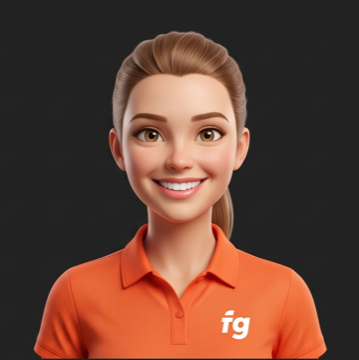
Sarah — The Motivator, AI golf coach
The Motivator

Sarah

High-energy coach focusing on confidence, tempo, and positive reinforcement.

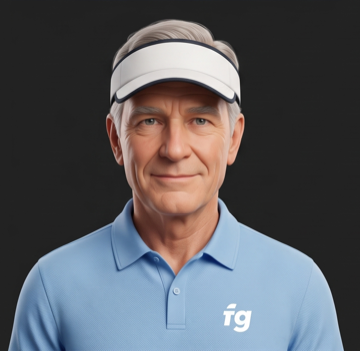
Tom — The Veteran, AI golf coach
The Veteran

Tom

Old-school veteran teaching rhythm, feel, and course management.

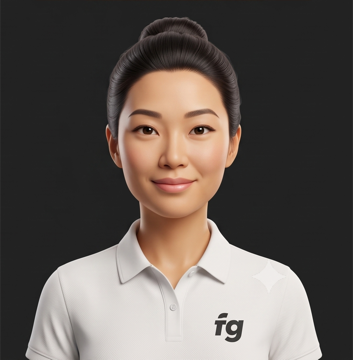
Mei — The Zen Master, AI golf coach
The Zen Master

Mei

Calm instructor focused on the mental game, relaxation, and smooth transitions.

Pricing

Try it free — 5 training sessions, no time limit

No countdown: use your 5 sessions whenever you make it to the range, fill the app with your own shots and see what it can do. After the trial, new shots, writing to the AI coach, the public profile and FG Lab need a subscription — your history, videos, stats and coach reports stay yours and fully accessible.

Free Trial
5 sessions
almost every feature included
  • Full AI camera & shot measurement
  • AI coach reports & chat
  • FG Lab experiments included
  • No payment details required
FG Vector Pro
Annual
current price shown in the app · cancel anytime
  • Unlimited AI camera & smart tracer (experimental)
  • Personal AI coach
  • Your numbers on your watch after every shot
  • Competitions with real prizes
  • Public profile & FG Lab experiments
FAQ

Frequently asked questions

Do I need any extra hardware?

No. FG Vector runs entirely on your iPhone's camera and microphone. The only thing we'd really recommend is a solid tripod — good phone placement just makes for a smoother session. You'll also need white balls and daylight or good lighting — FG Vector is a camera system.

How accurate are the numbers?

FG Vector measures the ball you actually hit in your shot video and estimates the shots it can't measure. The numbers are designed to be consistent — ideal for tracking trends, gapping clubs, and measuring progress over time.

Does it work for left-handed players?

Yes, fully. Set your stance in the profile and the entire camera view, silhouette, and tracking mirror automatically.

Are my swing videos uploaded anywhere?

Only in a few cases. Your shot videos stay on your phone and are not backed up to the cloud. A video is uploaded when you post it in FG Vector yourself (it is deleted together with the post or your account) or attach it in the support chat. And if the app measures the ball on fewer than 60% of the shots in a session, it uploads a few clips from that session after you close the camera, over Wi-Fi only, so our team can improve the measurement; they are deleted after 12 months. Sharing to social networks goes through the iOS share sheet. For the AI coach, and only with your consent, your training statistics, golf profile and chat messages go to Google AI (Gemini) so the coach can write reports and replies. Your swing videos, photos and e-mail are never sent. See our Privacy Policy.

What happens when the trial ends?

Recording new shots (the Training tab shows the subscription offer instead of the camera), writing to your AI coach, the public profile and FG Lab need a subscription. Your shot history, videos, statistics, bag, coach reports and profile remain fully accessible forever.

Start training smarter.

Start your 5 free training sessions today — no time limit.